Best Monitors for Small Desks (24″ and Under) — 2026
Disclosure: As an Amazon Associate, UnfoldDesk earns from qualifying purchases at no extra cost to you. Links marked “Check price on Amazon” are affiliate links.
The LG 24MP400-B is our top pick for most small desks. It’s a 24-inch IPS panel with a slim stand that fits a shallow surface, and it’s VESA-mountable if you want to reclaim the desk entirely. But the right screen depends on how much depth you have, whether you edit photos or just read documents, and whether you’d rather hang it on a monitor arm. Below we compare five monitors that make sense on a compact desk — from a budget 24-inch all-rounder to a color-accurate panel for creators and a 15.6-inch portable screen that disappears when you don’t need it.
Every pick here is under 25 inches wide (except one slim 27-inch that still fits a 20-inch-deep desk), has a stand with a modest footprint, and holds a 4.0+ star Amazon rating across thousands of reviews. We prioritized panel quality, stand size, VESA compatibility, and how well each one actually fits a tight workspace.
Compact 24-inch IPS with VESA mount — the screen that actually fits a shallow desk.
Our Top Picks at a Glance
| Monitor | Best for | Size | Resolution | Price |
|---|---|---|---|---|
| LG 24MP400-B | Best overall | 24″ | 1080p | Check price |
| Dell P2422H | Best for productivity | 24″ | 1080p | Check price |
| Dell S2721QS | Best 27″ that fits | 27″ | 4K | Check price |
| ASUS ProArt PA248QV | Best for creators | 24.1″ | 1200p | Check price |
| Arzopa 15.6″ Portable | Best portable / zero-footprint | 15.6″ | 1080p | Check price |
Best Overall: LG 24MP400-B
For most people working on a small desk, the LG 24MP400-B is the right default. The 24-inch IPS panel is sharp and easy on the eyes at 1080p, the stand’s footprint is compact enough for a shallow surface, and there’s a 75×75 mm VESA mount on the back if you’d rather put it on a monitor arm and free up the desk completely. It’s affordable, widely reviewed, and hard to get wrong.
- Why we picked it: IPS colors stay consistent from off-angles, and a 75 Hz refresh plus AMD FreeSync makes it comfortable for long work sessions.
- Small-desk friendly: slim bezels and a tilt-only stand keep the footprint tight, and VESA support means it can leave the desk entirely.
- Simple connectivity: two HDMI ports plus VGA cover laptops, desktops, and mini PCs without adapters.
| Panel | 24″ IPS, 1920 × 1080, 75 Hz |
| Stand | Tilt only; VESA 75 × 75 mm |
| Ports | 2× HDMI, 1× VGA |
| Dimensions (with stand) | ~21.3″ × 8.5″ × 16.3″ |
| Special | AMD FreeSync, flicker-safe, reader mode |
Pros: Great value; IPS panel with good viewing angles; VESA-mountable; low profile.
Cons: No height adjustment on the stock stand (a monitor arm fixes this); no DisplayPort or USB hub.
Best for: Everyday work, study, and streaming on a budget. Not ideal for: Color-critical photo editing — see the ASUS ProArt below. Check price on Amazon →
Best for Productivity: Dell P2422H
If you dock a laptop and spend all day on email, documents, and calls, the Dell P2422H earns its premium. The stand is the headline feature: full height, pivot, tilt, and swivel adjustments mean you can set it up ergonomically in a tight corner, and a built-in USB hub turns one laptop cable into a tidy dock. The 24-inch 1080p panel is the same size as the LG, but the ergonomics and hub are a step up.
| Panel | 24″ IPS, 1920 × 1080, 60 Hz |
| Stand | Height, pivot, tilt, swivel; VESA 100 × 100 mm |
| Ports | DisplayPort, HDMI, VGA, USB 3.2 hub (4× USB-A) |
| Special | ComfortView (low blue light), anti-glare |
Pros: Fully adjustable stand; USB hub reduces cable clutter; Dell’s reliable build and warranty.
Cons: Costs more than basic 24-inch panels; the USB hub is downstream-only (no Ethernet or USB-C power delivery).
Best for: Laptop users who want a clean, ergonomic single-cable setup. Not ideal for: Budget buyers — the LG does the core job for less. Check price on Amazon →
Best 27″ That Still Fits: Dell S2721QS
Bigger isn’t always better on a small desk, but a slim 27-inch 4K panel can work if you have about 20 inches of depth to spare. The Dell S2721QS gives you four times the pixels of 1080p, which means crisper text and more usable screen real estate — genuinely useful for spreadsheets, code, or side-by-side windows — without a monitor that overwhelms the room.
| Panel | 27″ IPS, 3840 × 2160 (4K), 60 Hz |
| Stand | Tilt only; VESA 100 × 100 mm |
| Ports | 2× HDMI 2.0, 1× DisplayPort 1.2 |
| Special | AMD FreeSync, dual 3 W speakers |
Pros: 4K sharpness for productivity; slim bezels and stand; good value for a 4K panel.
Cons: 27 inches needs more desk depth than a 24-inch; the stock stand only tilts, so a monitor arm helps a lot here.
Best for: Anyone who wants more screen space and has the depth for it. Not ideal for: Very shallow desks (under ~18 inches deep) — stick to 24-inch. Check price on Amazon →
Best for Creators: ASUS ProArt PA248QV
For photographers, designers, or anyone who cares that “the color on screen is the color you get,” the ASUS ProArt PA248QV is the pick. It’s factory calibrated with a delta-E under 2, covers 100% of sRGB, and uses a 16:10 aspect ratio that gives you a little extra vertical space for editing timelines and toolbars — all in a 24.1-inch size that still fits a modest desk.
| Panel | 24.1″ IPS, 1920 × 1200 (16:10), 75 Hz |
| Color | Factory calibrated ΔE<2, 100% sRGB / Rec.709 |
| Stand | Height, pivot, tilt, swivel; VESA 100 × 100 mm |
| Ports | DisplayPort, HDMI, VGA, USB hub |
Pros: Accurate color out of the box; 16:10 adds useful vertical space; fully adjustable stand.
Cons: Costs more than general-use 24-inch monitors; 75 Hz won’t matter for photo work but isn’t a gaming panel either.
Best for: Photo/video editors and designers on a budget. Not ideal for: Gamers wanting high refresh rates. Check price on Amazon →
Best Portable / Zero-Footprint: Arzopa 15.6″ Portable Monitor
If you genuinely have no room for a permanent monitor, a portable 15.6-inch screen is the clever answer. The Arzopa is a laptop-style panel that runs off a single USB-C cable, folds flat into a bag, and can be propped up only when you need a second screen. It’s also the natural travel companion for a laptop-and-mini-PC setup.
| Panel | 15.6″ IPS, 1920 × 1080, 60 Hz |
| Connection | USB-C (power + video), mini-HDMI |
| Weight | ~1.5 lbs |
| Special | Built-in kickstand/cover, plug-and-play |
Pros: Takes up no permanent desk space; single USB-C cable; great as a second screen for laptops and mini PCs.
Cons: Smaller and dimmer than a desktop monitor; the built-in stand offers limited angle adjustment.
Best for: Tiny desks, travel, and dual-screen use without a permanent setup. Not ideal for: Anyone who wants a large, permanent primary display. Check price on Amazon →
How We Chose These Monitors
We started from what actually constrains a small desk: depth, width, and the stand’s footprint — not just the diagonal screen size. Then we filtered for four criteria.
- Footprint: every pick has a compact stand or VESA support, so it either fits a shallow surface or leaves the desk entirely.
- Panel quality: IPS for consistent color and viewing angles, which matters more in a corner where you can’t always sit dead-center.
- Ergonomics and mounts: preference for VESA compatibility and, where possible, adjustable stands.
- Proven reliability: 4.0+ star Amazon ratings across thousands of reviews, from mainstream brands with long warranties.
What we ruled out: ultrawide and 32-inch panels that dominate a small desk, monitors with bulky non-VESA stands, and unbranded or low-review panels where reliability and warranty are uncertain.
What to Look for in a Monitor for a Small Desk
Measure your depth before you shop
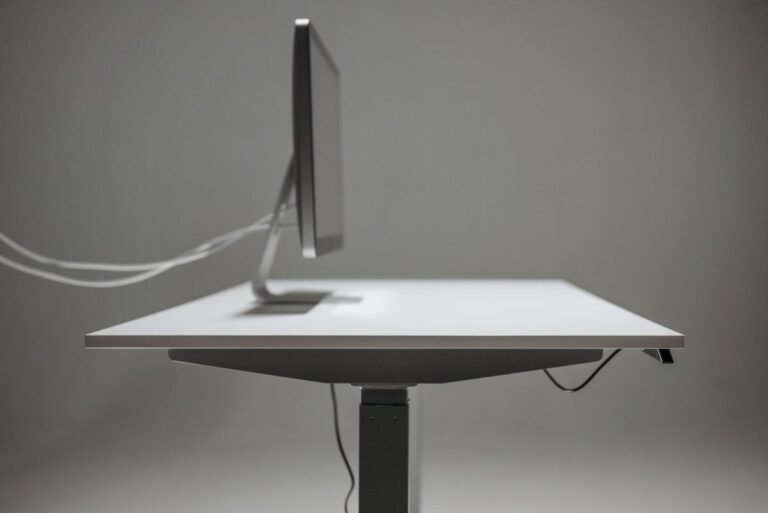
A monitor’s stand can add 7–9 inches of depth beyond the screen itself. If your desk is under ~18 inches deep, prioritize a VESA mount and a monitor arm (or a wall mount) so the panel floats over the surface instead of eating it. For shallow desks, 24-inch panels with slim stands are the safest default.
Resolution and size
At 24 inches, 1080p is perfectly sharp for most work. Step up to 27 inches only if you want 1440p or 4K and have the depth for it. More pixels mean more windows side by side, but on a small desk the extra size is the real trade-off.
Stand vs. arm
A height-adjustable stand is ideal for ergonomics, but a monitor arm clamped to the desk edge frees the entire surface and adds flexibility. If you already own a good arm (or plan to), make sure the monitor has a standard VESA pattern — all five picks above do.
Ports and docking
If you use a laptop or mini PC, a monitor with a USB hub (like the Dell P2422H) can reduce the mess of cables in a small space. Check whether the monitor can pass through power and video over a single USB-C connection to keep the setup to one cable.
Frequently Asked Questions
Q: What size monitor is best for a small desk?
A: 24 inches is the sweet spot for most small desks — it fits a shallow surface and still feels roomy at 1080p. Go 27 inches only if you have about 20 inches of depth and want higher resolution, or choose a portable 15.6-inch panel for a nearly zero-footprint setup.
Q: Can I mount a monitor to free up desk space?
A: Yes. Any monitor with a VESA mount (75×75 or 100×100 mm) can go on a desk-clamped monitor arm or a wall mount, which lifts the screen off the desk entirely. All five monitors in this guide are VESA-compatible.
Q: Is 1080p good enough for office work?
A: For most document, email, and browsing work at 24 inches, 1080p is sharp and comfortable. If you regularly work with spreadsheets or side-by-side windows, a 1440p or 4K panel gives you noticeably more usable space.
Q: Do I need a special stand for a shallow desk?
A: Not necessarily, but a monitor arm is the best upgrade: it clamps to the desk edge, frees the whole surface, and gives you height and tilt adjustment. For very shallow desks it’s often the difference between a monitor that fits and one that doesn’t.
Q: Can I use a portable monitor as my main screen?
A: You can, especially for a minimal or travel setup, but a desktop monitor is brighter, larger, and more comfortable for all-day use. A portable panel is best as a second screen or for genuinely tiny desks.
Final Thoughts
For most small desks, the LG 24MP400-B is the best mix of size, price, and flexibility — and it’s VESA-ready if you want to get it off the desk later. If you work all day on a laptop, the Dell P2422H‘s adjustable stand and USB hub are worth the step up, and creators should look at the ASUS ProArt PA248QV. Check current prices on Amazon, since monitor pricing shifts often.
UnfoldDesk is a participant in the Amazon Services LLC Associates Program. Links marked “Check price on Amazon” are affiliate links that earn us a commission at no extra cost to you.